Invisible by design.

GeoGhost shows you the answer the moment a round starts. Your stream, screen share, or recording sees nothing. Only you do.

Bonus Built-in auto-play XP farm grinds solo maps while you AFK. Same license.

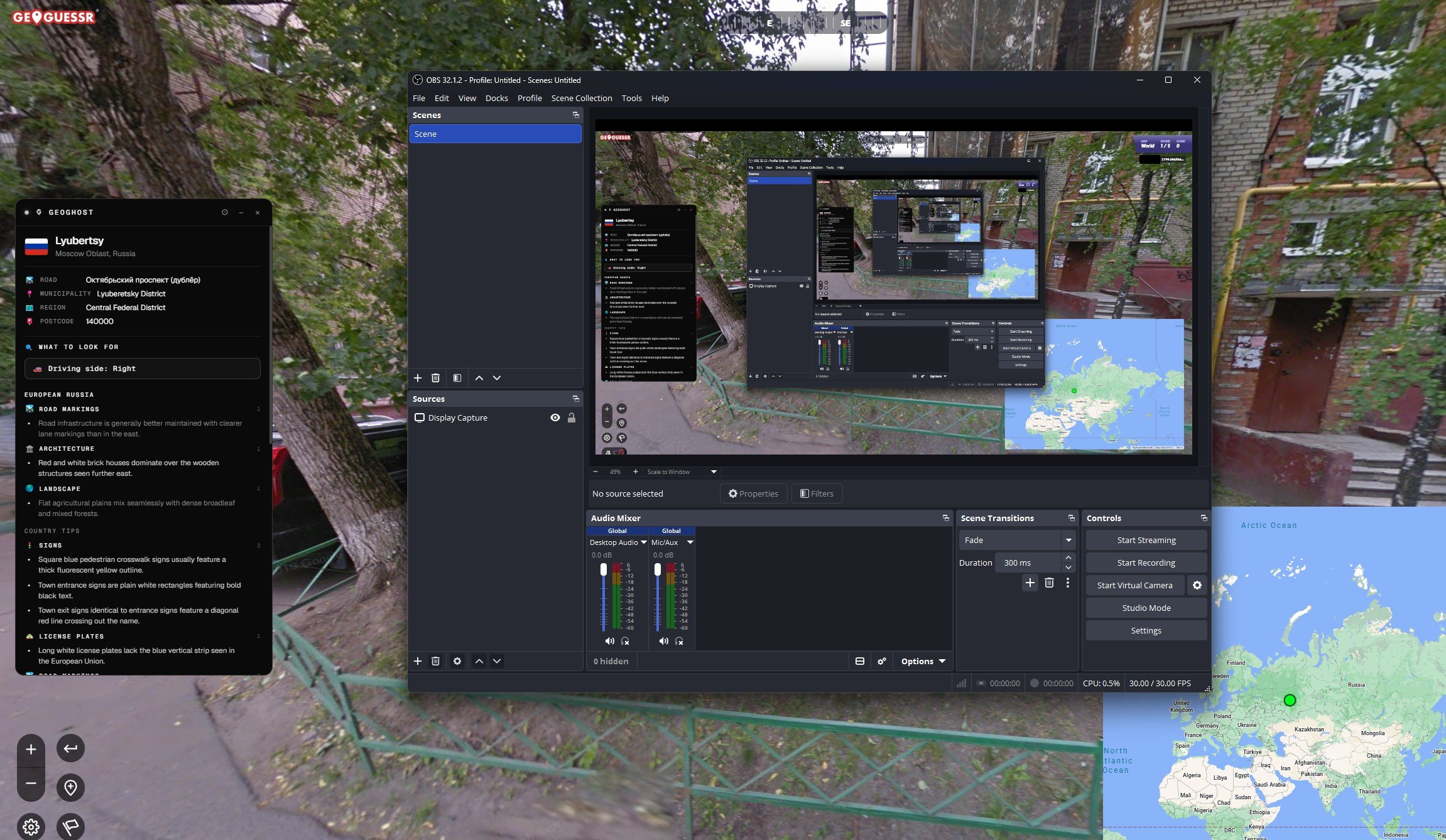
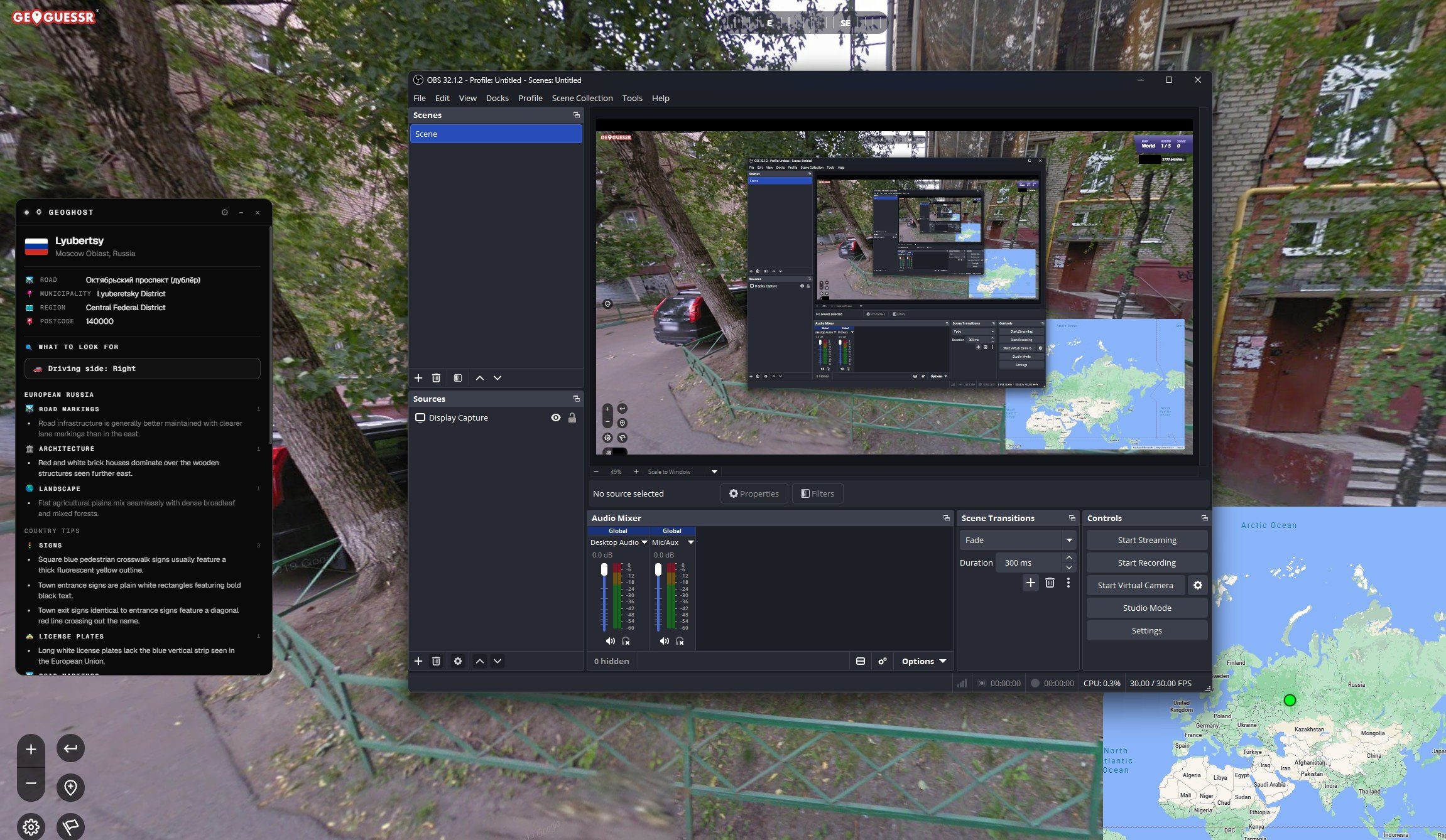
OBS Display Capture recording of GeoGuessr showing the GeoGhost overlay because stream-invisible mode is off — viewers would see everything. OBS Display Capture recording with stream-invisible mode on — the GeoGhost GeoGuessr overlay is completely hidden from the capture while still visible to the player. Without stream-proof Exposed Viewers see everything With stream-proof Ghost Viewers see nothing

Drag the handle. Same OBS recording, same moment. Only one side has your overlay in it.

Why GeoGhost

Three things nothing else does.

Other helpers draw on top of the page. Your viewers see exactly what you see, and the run is basically over. GeoGhost runs in its own window that Windows itself keeps hidden from anything recording your screen. Built by a GeoGuessr player who got tired of watching streamers get caught.

01

Built to disappear.

Your computer hides this window from anything that records your screen. Stream on OBS, share on Discord or Teams, record with ShadowPlay or Steam. None of them can see it. Only you can.

02

Pixel-perfect pin.

A small dot lands on the exact spot on your map where the round is. If it's slightly off the first time, nudge it once with the arrow keys. After that it sticks to the right place no matter how you zoom or drag.

03

Tips for every country.

Other tools dump coordinates. GeoGhost also tells you what to look for: driving side, road-line colors, plate styles, vegetation, road-sign quirks. Almost a hundred countries with regional breakdowns inside, from Texas to Yucatán to Quebec.

Tips, your way

Not just coordinates.

Almost a hundred countries are written in, with regional sub-zones inside the big ones. The overlay shows you the right set the moment the round loads. Add your own tips on top, hide the ones you don’t agree with, and share your set with friends or the Discord.

Your own clues

Per country, per continent, or always on

Got a clue that catches landmarks the built-in set misses? Drop it in. Tag it to one country, a whole continent, or every round. Pick a category and an importance level, and it shows up in the overlay alongside the rest.

Hide what doesn’t help

One click on the overlay

Hover any built-in tip, click the small X, gone. The overlay stops showing it. Changed your mind later? Open settings and restore it (or restore everything at once).

Share a set

Export. Send. Import. Done.

Export your tip set to a small file. Drop it in the Discord, mail it to a friend, post it in a tournament chat. They open it on their side and your tips slide into their set. Nothing of theirs gets overwritten.

95+ Countries with tips
120+ Regional sub-zones
2000+ Individual clues
6 Game modes covered

Classic, duels, team duels, battle royale, live challenges, bullseye. NMPZ, no-move, every map. The overlay reads the same data either way.

Auto-play XP farm

Idle XP, on auto-pilot.

Same license, second tool. GeoGhost includes a built-in auto-play engine that farms GeoGuessr XP on solo single-player maps while you sleep, work, or stream something else. Solo-only by design, with tunable pace and behavior to fit how you use it.

  • Solo single-player only

    Hard limits, not preferences. Auto-play refuses to run on duels, battle royale, team duels, live challenges, or any other multiplayer mode. Solo maps only. No ruined matches for anyone else.

  • Built to blend in

    Plays at the pace and rhythm of an actual session, not a robot grinder. You set the intensity; the engine handles the rest. Reads as a regular player, not a clock.

  • Set your pace

    From a few rounds an hour to all-night runs. Stack it overnight, sprinkle some while you work, or open it up entirely when speed matters more than caution. You decide the balance.

  • Live session stats

    Track rounds, games, levels gained, and XP gained per session, with a duration timer that runs the whole time. Reset whenever you want a fresh baseline, or leave it running for the whole night and check what you earned.

Auto-play is locked behind a one-time disclaimer inside the app: GeoGuessr's terms prohibit automation, account suspension is possible, banned accounts cannot be refunded. Use it knowing the risk.

Setup

Three minutes. Once.

Buy a key, paste it into the app along with your email, click the install link the app shows you. That's all of it. We don't make you confirm anything by email and there's no setup form to fill out.

Step 01

Pick a tier.

Seven days, thirty days, a year, or lifetime. Pay by card. Your key shows up on screen and in your inbox right away.

Step 02

Open the app.

Download once, install on Windows. Type your email, paste your key, choose a password. The overlay opens. It is already invisible to anyone watching your stream.

Step 03

Hook it up.

Follow the in-app setup wizard. It's a short on-screen flow. Open GeoGuessr, start a round, watch your overlay fill in.

Built for streamers

Hide it. Right now.

The window itself is already invisible to anything that records your screen. These are the extras for when someone is standing behind you in real life, or when you just want it gone for a few minutes.

Ctrl + Shift + H

Panic-hide.

One hotkey. The overlay and the map pin vanish instantly. Press your normal show-hide hotkey to bring them back. Rebind to any combo you like.

Ctrl + Shift + Q

Panic-quit.

Worried someone is about to poke around your computer? One hotkey and GeoGhost is gone. Completely. Nothing left for anyone to find.

Out of the rotation.

If someone cycles through your open windows on your computer, the overlay is simply not in the list. They flip past without ever seeing it exists.

Wear a different name.

Call it whatever you want. "Notepad", "Spotify", "Discord". Anyone glancing over only sees the name you picked.

Tucks itself away.

Optional. Click anywhere outside the overlay and it disappears on its own. Bring it back any time with your hotkey.

Yours to shape.

Resize it, drag it, drop the opacity. Show or hide the flag, the clues, the driving side, the address row. There's a compact mode for tight screens. The pin's color, size and pulse rate are all yours to set.

Pricing

Pay once. Or rent it.

Every tier gives you the full product. No locked features, nothing held back. The only thing you choose is how long you want access.

Starter

€9 €25

Try it on your setup. Make sure it fits.

  • 7 days of access
  • All game modes
  • Stream-invisible

Standard

€35 €55

Enough for a tournament run or one long streak.

  • 30 days of access
  • All updates during access
  • Sign in on any device

Lifetime

€249 €399

One payment. Works forever after that.

  • No expiry
  • All future versions
  • Priority support

FAQ

Things people actually ask.

Email support@geoghost.gg if your question isn't here, or hop in the Discord and ask there. Replies usually within a day.

Will my viewers actually not see it?
No. Your screen-recording programs simply cannot see this window. Stream with OBS, share your screen on Discord or Teams, record clips with ShadowPlay or Steam. None of them pick it up. You see it on your monitor. They don't see anything.
Is this allowed by GeoGuessr?
Probably not. Use it accordingly. GeoGhost never signs in to your GeoGuessr account, never sends your moves to GeoGuessr, and never stores any of your gameplay. The app runs locally on your machine. The only thing that leaves your computer is an anonymous coordinate lookup to a public geocoding service so the overlay can show you the road, postcode and region. No account, no identity, nothing tied to you.
How does the auto-play XP farm work?
Start a solo single-player game and flip auto-play on inside GeoGhost. The engine plays each round for you and keeps going until you stop it. Pace is tunable from the settings panel. Solo maps only. Never runs on duels, battle royale, team duels, live challenges, or any multiplayer mode.
Will my account get banned for auto-play?
Possible. GeoGuessr's terms of service prohibit automation, and account suspension is on the table. Nothing in this category is bulletproof. We cannot refund accounts that get banned for ToS violations. Use it on the account you're willing to risk.
How much XP per hour does auto-play give me?
Depends on your settings and how generous the map is. At conservative pacing you stack steady passive XP. Push it harder and you can grind tens of thousands of XP overnight. The live session stats inside GeoGhost show you exactly how many rounds, games, levels and XP you have gained, with a duration timer that runs the whole time.
What's different between the tiers?
Only how long you have it for. Every tier gives you the full product. Every feature, every game mode, every update during the time you're active. Lifetime keeps working forever, including every future version.
Does it work on Mac?
Not yet. The trick that hides the overlay from screen recorders only works on Windows for now. We're looking into Mac support, but it needs a different approach. If you only play on Mac, hold off until we announce it.
Can I get a refund?
All sales are final once your key arrives. At checkout you tick a box agreeing to immediate delivery, which waives the standard right of withdrawal that would otherwise apply to digital purchases. That checkbox is part of buying a key. If a key fails for a technical reason on our side we replace it free, no questions. Full details are on the refund page.
What happens if GeoGhost shuts down?
Lifetime keys keep working for as long as we keep GeoGhost running. We promise to keep it running for at least three years from the day you buy a lifetime key. If we ever close shop sooner, lifetime holders get a fair partial refund based on the time left.
Does GeoGhost work with all GeoGuessr modes?
The overlay works in every mode: classic, duels, team duels, battle royale, live challenges, bullseye, NMPZ, no-move. It reads the same round data either way. Auto-play is the exception — that only runs on solo single-player maps and never on duels, battle royale, team duels, live challenges, or any other multiplayer mode.
How is GeoGhost different from other GeoGuessr overlays?
Most GeoGuessr helpers draw on top of the page. Anything recording your screen sees them and shows them to your viewers, which is how streamers get caught. GeoGhost runs in its own window that Windows itself keeps hidden from OBS, Discord, ShadowPlay, Steam and Teams. The overlay also includes country tips for almost a hundred countries and a built-in solo auto-play XP farm. One license covers both tools.
How long does setup take?
About three minutes from purchase to first round. Pay, install the Windows app, type your email and key, follow the in-app setup wizard. No coding, no command line, no fiddly configuration.

The overlay your stream can't see.

Pick a tier, install the app, paste your key in. Whole setup takes about three minutes.

Or pick a longer tier